On this page
- What are Shops?
- Why use Shops?
- Shop types overview
- Pop-Up Shops
- Company Shops
- Marketing Shops
- Connected Shops (Shopify)
- Compare Shops
-
- How Shops work
- Shop fees
What are Shops?
Shops are online storefronts you can create and share with your clients or their audience. Launch a shop in minutes. Every order flows directly into commonsku. Run multiple shops across clients at once.
They allow people to:
- Browse products
- Place orders
- Pay (if enabled)
- Generate sales orders
Everything flows directly into commonsku—no manual work, no spreadsheets, no back-and-forth.
Why use Shops?
Shops are designed to simplify your workflow and increase revenue.
Key benefits
- Launch quickly – Create a shop in minutes
- Reduce manual work – No emails or spreadsheets
- Let customers self-serve – They place their own orders
- Scale your business – Run multiple shops at once
Shops remove friction from the ordering process and help you scale faster.
Shop Types Overview
Each shop type is designed for a different use case:
| Shop Type | Best For | Outcome |
|---|---|---|
| Pop-Up Shop |
Employee apparel programs |
Collect multiple orders → combine into one clean sales order ready for production |
| Company Shop | Employee stores Corporate programs Ongoing merch initiatives |
Ongoing ordering → each order becomes its own project automatically |
| Marketing Shop | Showcasing products to prospects | Prospect browses → you assign to a client → convert into a sales order |
| Shopify Connected Shop | Syncing an existing Shopify store | Orders sync automatically → managed in commonsku |
💡 Tip: Start with your goal—then choose the shop type that fits best.
Pop-Up Shops
What are Pop-Up Shops?
Pop-Up Shops are simple, fast online stores. They are best for short-term campaigns and group ordering.
Common scenario
“We need to collect t-shirt sizes and payments from 80 employees before the company retreat next month.”
Pop-Up Shops are the fastest way to run a group order. Send one link, let everyone place and pay on their own, then combine all checkouts into a single production-ready sales order. No minimum quantities are required upfront.
They’re perfect when you need to:
-
Launch quickly
-
Collect multiple orders
-
Turn them into one large order
[Back to top]
Why distributors use Pop-Up Shops
Pop-Up Shops replace manual processes like:
-
Collecting sizes over email
-
Managing spreadsheets
-
Chasing payments
Instead, you can:
-
Send one link
-
Let people order on their own
- Choose how orders are created:
- Combine multiple checkouts into one sales order
- Or keep them as separate sales orders
💡 You stay in control of how orders are structured for production.
[Back to top]
What makes them different
Pop-Up Shops are intentionally simple, but powerful where it matters:
- No minimum quantities required upfront
- One retail price per product
- credit card checkout
- Orders can be grouped into one sales order
-
Flexible controls:
- Shipping Charge
- Checkout Limit
- Coupons
- Free products
Pop-Up vs. Company Shop
If your client needs one order for an event, fundraiser, campaign, or limited-time program → use Pop-Up Shop.
If your client needs employees to reorder throughout the year on their own schedule → use Company Shop.
👉 Learn more:
Company Shops
Best for long-term client programs.
- Employee stores
- Corporate programs
- Ongoing merch initiatives
Why distributors use Company Shops
Company Shops help you move from one-off orders to ongoing programs.
Instead of:
- Rebuilding orders every time
- Managing repeat requests manually
You can:
- Set up one store
- Let clients order whenever they need
- Automatically generate a sales order for each order placed
💡Unlike Pop-Up Shops, you cannot combine multiple orders into a single sales order.
Each order creates its own project automatically — no manual setup required
What makes Company Shop different
Company Shops are built for structure and consistency:
- Enforces minimum quantities
- Pre-defined billing and shipping options
- Credit card checkout
- Supports inventory tracking
- Designed for repeat and ongoing orders
Pop-Up vs. Company Shop
Company Shops do not combine multiple orders into one sales order.
Each checkout becomes its own project and sales order automatically. This is intentional because ongoing programs need separate order records, inventory tracking, and repeat purchasing workflows.
👉 Learn more:
Marketing Shops
Marketing Shops are product showcase storefronts designed to help you win new business.
They allow you to present curated product collections without assigning a client.
They’re perfect when you need to:
- Showcase products to prospects
- Share curated collections
- Create quick, branded presentations
Why distributors use Marketing Shops
Marketing Shops help you sell more effectively.
Instead of:
- Sending PDFs or static presentations
- Explaining products back and forth
- Manually recreating orders later
You can:
- Share a live, interactive shop
- Let prospects explore products on their own
- Turn interest into actual orders
💡 Marketing Shop products also allow shoppers to upload their own artwork, so there’s no need for you to upload images in advance.
What happens after a shopper places an order via the marketing shop?
- The order is not immediately tied to a client
- You review the request or order
- You assign it to a client when ready
- Once assigned, it becomes a sales order in commonsku
What makes Marketing Shops different
Marketing Shops are focused on selling and showcasing:
- No client required to create the shop
- Easy to share or embed
- Flexible product collections
- Orders are created only when assigned to a client
- Clients can upload their own artworks
[Back to top]
Connected Shops (Shopify)
What are Connected Shops?
Connected Shops allow you to sync your Shopify store with commonsku.
This lets you manage your ecommerce operations in one place without duplicating work.
They’re perfect when you need to:
- Connect an existing Shopify store
- Centralize order management
- Scale ecommerce operations
Why distributors use Connected Shops
Connected Shops streamline your workflow.
Instead of:
- Managing Shopify and commonsku separately
- Manually recreating orders
- Exporting and re-importing data
You can:
- Sync your Shopify store
- Orders are automatically imported into commonsku
- Manage everything in one system
[Back to top]
What makes them different
Connected Shops combine ecommerce with operational control:
- Sync products from Shopify
- Import orders directly into commonsku
- Aggregate checkouts into sales orders
- Download order data (CSV)
👉 Learn more:
Compare Shops
Here’s a quick comparison to help you choose the right shop:
| Feature | Pop-Up Shop | Company Shop | Marketing Shop | Connected Shop |
|---|---|---|---|---|
| Best for | Employee apparel programs, Event or campaign, Gifting programs | Employee stores Corporate programs |
Prospecting | Shopify integration |
| Inventory | ✅ | |||
| Minimum quantities enforced | ✅ (optional) | ✅ | ✅ | |
| Option to show quantity price breaks | ✅ | ✅ | ||
| Coupons | ✅ | |||
| Upcharges to any product's size / color variants | ✅ | ✅ | ✅ | ✅ |
| Limited to one client | ✅ | ✅ | ✅ | |
| Option to add additional retail mark-up | ✅ | |||
| User can upload artwork | ✅ | |||
| Sales order created upon checkout | ✅ | ✅ | ||
| Aggregation of orders into a single sales order | ✅ | ✅ | ||
| User may enter shipping address | ✅ | ✅ | ✅ | |
| Option to add tax at checkout | ✅ | ✅ | ||
| Custom checkout questions | ✅ | ✅ | ✅ | |
| Option to enable credit card checkout | ✅ | ✅ | ||
| Option to create invoice at checkout | ✅ | |||
| Option to create receipt at checkout | ✅ | ✅ | ||
| Option to set checkout limit | ✅ |
|
💡 If you need to collect group orders and combine them into one sales order → use Pop-Up 💡 If you need long-term → use Company Shop |
Shops Checklist
Click here for your very own Shop's checklist! This list will help you qualify, build, support, and close your Shop, and provide you with the resources you need along the way.
Please reach out to support@commonsku.com if you have any questions about the tips or resources available on the checklist.
How Shops Work (At a Glance)
All shop types follow the same flow. The differences are in how orders are structured and when your sales order is created — both covered in detail below.
Create your shop: Pick a type, name it, and customize the branding.
Add products: Set prices, designs, variants, and product details.
Share the link: Send the shop to your client, their employees, or prospects.
Customers place orders: Customers can self-serve and place their own orders directly through the shop.
Orders are created automatically: Orders flow directly into commonsku — organized and ready for production.
Shop Fees
Shop fees are based on volume, which means your effective rate decreases as your total shop sales increase.
The more volume you run through Shops, the lower your effective rate.
Shop fees are designed to scale with your business, so as your sales increase, your cost per order decreases.
For each shop, the following tiers apply:
- 2.5% on the first $25,000 (from $0–$25,000)
- 2.0% on $25,000–$50,000
- 1.5% on $50,000–$100,000
- 1.0% on sales above $100,000
💡 Volume discounts are available for all plans (Essentials, Advanced, and Enterprise).
🛑 All Shop pricing and fee calculations are processed in USD. If payments are made in another currency, the amount will be converted to USD for fee calculation purposes.
For Pop-Up shops
- Fee is charged at checkout
- There is a 7-day grace period before the fee appears in your billing report
- If checkouts are exported or aggregated within that window, the fee is captured immediately
💡 You’ll see a warning message if you try to do any of the following during the grace period:
- Export checkouts (e.g., CSV)
- Create a project from checkouts
- Perform any action that finalizes the orders
If you export checkouts or create a project multiple times, you will not be charged multiple times.
Note:
Exporting checkouts to ShipStation does not trigger the fee.
For Company Shops:
- Fee is charged immediately at checkout
- Orders are instantly converted into sales orders
For Marketing Shops:
Fee is charged when an order is assigned to a client and converted into a sales order
For Shopify (connected Shop):
- A 1% fee is applied to all Shopify imported checkouts
- There is a 7-day grace period before the fee appears in your billing report
- If checkouts are exported or aggregated within that window, the fee is captured immediately
What's a Shop Talk?
Please review the relevant content before booking your Shop Talk. For more information, check out our help articles, try the Shops wizard, or catch up on our Past Events.
To book a Shop Talk:
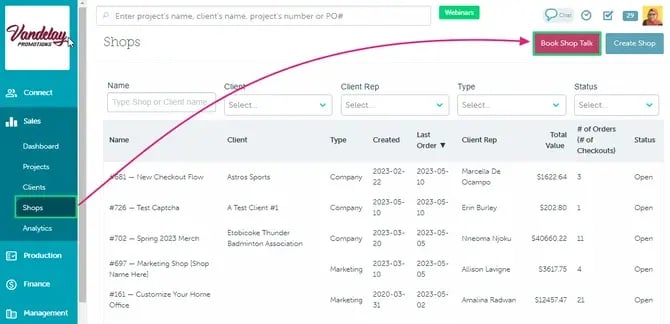
- In the commonsku Shops tab, click to Book Shop Talk
- Select a time and date
- Enter your details
- Click Confirm
Shop Expiration Reminder Emails
These reminders give everyone a chance to extend the shop if needed or start wrapping things up before expiration—helping avoid missed orders and last-minute surprises.
Scale Your Sales with commonsku Shops
FAQs
- Which shop should I use?
- Can I combine multiple orders into one sales order?
- When is a sales order created?
- Can customers upload their own artwork?
- Do I need to manage inventory?
- Can I control who accesses a shop?
- Do all shops support credit card checkout?
- When are shop fees charged?
- Will I be charged multiple times if I export checkouts more than once?
- Does exporting to ShipStation trigger a fee?
- Can I change the shop type after creating it?
- Can I run multiple shops at the same time?
-
What happens if a customer checks out after my shop closes?
14. How do shop expiration reminder emails work?
- Use Pop-Up Shops for campaigns and group orders
- Use Company Shops for ongoing client programs
- Use Marketing Shops to showcase products to prospects
- Use Connected Shops if you already use Shopify
💡 You can use the Shops Wizard when creating a shop. Just answer a few questions, and it will suggest the best option for your needs.
To use the Shop Wizard:
- In the Shops tab, click Create Shop
- Click the Get Started button
- Answer all questions as accurately as possible
|
💬 Still not sure? No worries! You can book a Shop Talk to connect with a specialist, walk through your use case, and get personalized recommendations. To book a Shop Talk:
|
Can I combine multiple orders into one sales order?
Yes, only with Pop-Up Shops you can combine multiple checkouts into one sales orderWhen is a sales order created?
- Pop-Up Shops → After you aggregate or export checkouts to create a project
- Company Shops → Immediately when the order is placed
- Marketing Shops → When assigned to a client
- Connected Shops → When orders are imported from Shopify
Can customers upload their own artwork?
Yes, in Marketing Shops, customers can upload their own artwork when placing an order.
Do I need to manage inventory?
- Company Shops → Yes, supports inventory tracking
- Pop-Up & Marketing Shops → No inventory required
- Connected Shops → Inventory is managed in Shopify
Can I control who accesses a shop?
Yes, depending on the shop type, you can:
- Share a private link
- Restrict access (e.g., by email domain)
Do all shops support credit card checkout?
- Pop-Up Shops → Yes
- Company Shops → Yes
- Marketing Shops → No
- Connected Shops → Handled through Shopify
- Pop-Up Shops → At checkout (with a 7-day grace period)
- Company Shops → Immediately at checkout
- Marketing Shops → When converted to a sales order
- Connected Shops → When orders are imported
Will I be charged multiple times if I export checkouts more than once?
No. The shop fee is only charged once per checkout, even if you export or process it multiple times.
Does exporting to ShipStation trigger a fee?
No. Exporting checkouts to ShipStation does not trigger a fee.
Can I change the shop type after creating it?
No, the shop type cannot be changed after creation but you can copy the shop to a new shop and you can choose different shops type when you are copying it.
Can I run multiple shops at the same time?
Yes. You can create and manage multiple shops across different clients and use cases.
What happens if a customer checks out after my shop closes?
If a shop has expired or is closed, customers will no longer be able to place orders.
When they open the shop link, they will see a message indicating that the shop is no longer active.
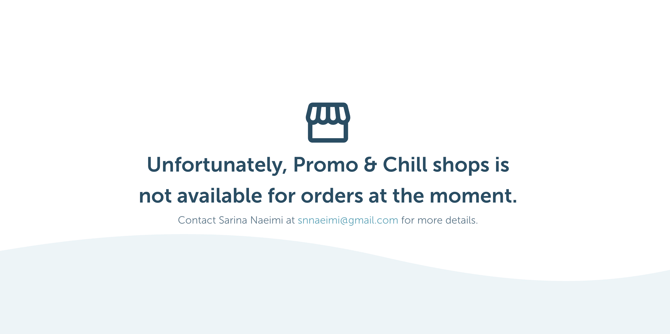
You can reopen the shop at any time if you’d like to accept orders again.
How do shop expiration reminder emails work?
If your shop has an expiration date set, commonsku will automatically send reminder emails to the Client Rep, Sales Rep, and Shop Contact 7 days before and 1 day before the shop expires. These reminders help ensure everyone is aware of the upcoming expiration, giving you time to extend the shop if needed or wrap up any remaining orders. No reminder emails are sent for shops that do not have an expiration date configured.