Beta: Currency Normalized Reporting is currently in beta for Enterprise accounts. During the beta, currency conversion is available in the Commission Report and Sales Rep Report.
- What is Currency Normalized Reporting?
- Turn on Currency Normalized Reporting
- Add and manage monthly exchange rates
- Convert a report to one currency
- When a monthly exchange rate is missing
- Turn off Currency Normalized Reporting
- FAQs
What is Currency Normalized Reporting?
If your company works in multiple currencies, reports can contain amounts in different currencies.
Currency Normalized Reporting lets you convert those amounts into a single currency using exchange rates set for each month.
With Currency Normalized Reporting, you can:
- Set exchange rates by month and year
- Convert supported reports into a currency of your choice
- Use historical exchange rates when viewing older reporting periods
- Switch back to the original currencies at any time
For example, if you're reviewing transactions from March and April, amounts from March are converted using your March exchange rate, while amounts from April use your April rate.
Converting a report only changes how amounts are displayed in the report. It doesn't change the currency or exchange rate saved on your projects, sales orders, invoices, bills, or other records.
Turn on Currency Normalized Reporting
To enable Currency Normalized Reporting:
- Go to Settings > Company Settings > Setup
- Open Currency Conversion.
- Turn on Enable currency normalized reporting.
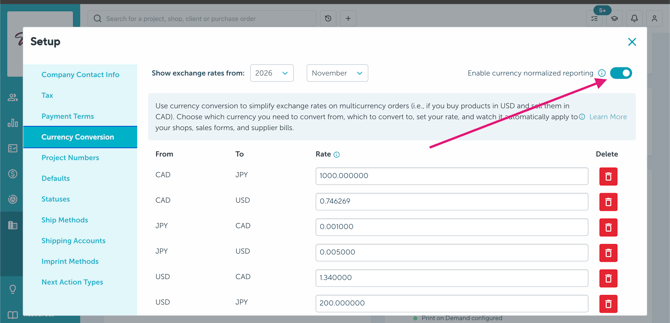
The first time Currency Normalized Reporting is enabled, your existing currency conversion rates are copied into the current month to give you a starting point.
Your existing currency conversion rates remain unchanged.
Once enabled, you'll also see month and year options that let you manage exchange rates for individual months.
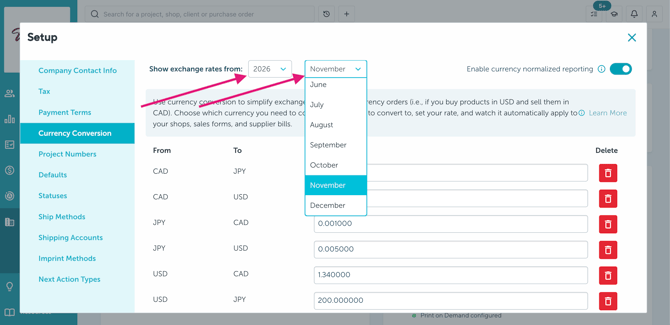
Add and manage monthly exchange rates
When Currency Normalized Reporting is enabled, exchange rates are managed by month.
You can select any month from January 2012 through the following month.
Add an exchange rate
- Select the month and year you want to manage.
- Add an exchange rate.
- Select the currencies you're converting from and to.
- Enter the exchange rate.
- Save your changes.
Exchange rates don't automatically carry over from one month to the next.
For example, a USD to CAD rate entered for November won't automatically become the December rate. You'll need to add the December rate separately.
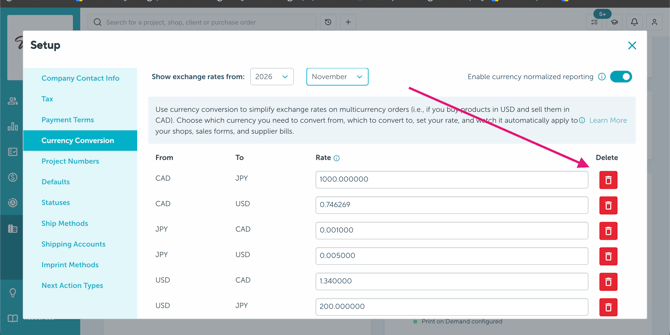
Edit or delete an exchange rate
Select the month and year containing the exchange rate you want to update.
From there, you can edit or delete the rate.
Changes only apply to the month you've selected and won't affect rates saved for other months.
Tip: You can enter rates for the following month ahead of time. This can help ensure your reporting is ready when the new month begins.
Convert a report to one currency
Currency Normalized Reporting is currently available in:
- Commission Report
- Sales Rep Report
To convert a report:
- Go to the Reports > open the Commission Report or Sales Rep Report.
- Find Convert to currency in the report filters.
- Select the currency you want to use.
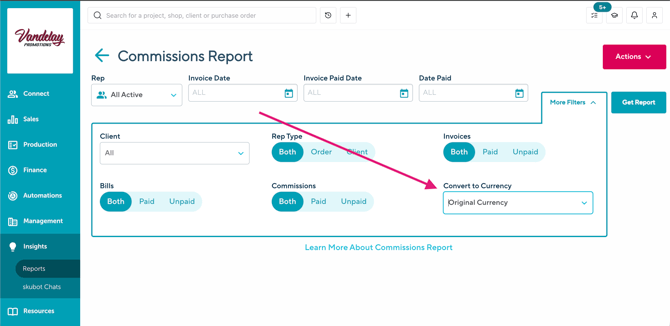
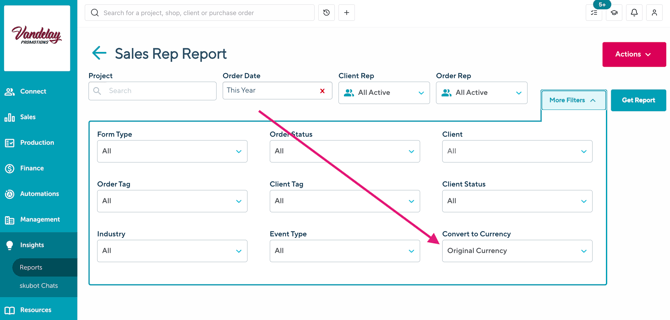
The default option is Original, which displays amounts in their original currencies without conversion.
When you select another currency, commonsku converts each amount using the exchange rate for the month associated with that record.
Converted amounts are rounded to two decimal places.
Identify converted amounts
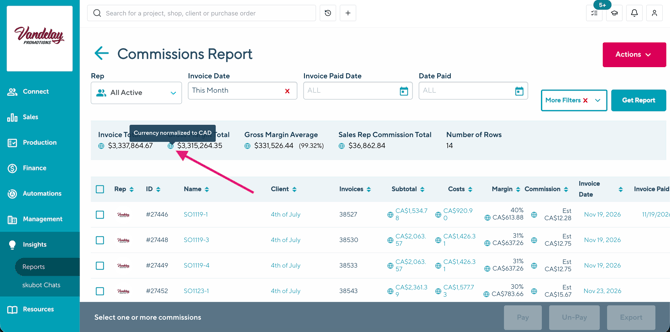
Converted amounts display a globe icon.
Hover over the icon to see the original currency and the currency the amount was converted to.
Amounts that were already in the currency you selected don't need to be converted.
Report totals
commonsku converts each amount using its corresponding monthly exchange rate before calculating the report totals. This ensures that all amounts included in the total are in the same currency, even when transactions occurred in different months.
For example, if you convert your report to USD, amounts from October and November are converted using their respective monthly exchange rates before being added together.
Saved reports
If you save a report with a currency selected, commonsku remembers your selection when you open the saved report again.
When a monthly exchange rate is missing
commonsku needs the required exchange rates for each month included in the report before it can convert the report.
If a required monthly exchange rate is missing, commonsku displays a message indicating that exchange rates are missing instead of displaying the converted report results.
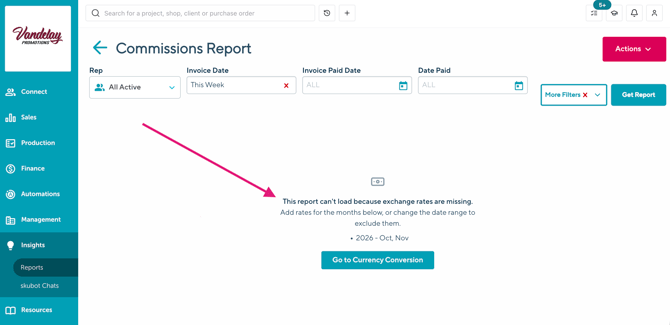
To view the report, you can either:
- Add the missing exchange rates in Currency Conversion and try again.
- Select Original from the Convert to currency dropdown to view the report without currency conversion.
If you don't have permission to manage exchange rates, contact your team's administrator.
If you have permission to manage exchange rates, you'll be able to go to Currency Conversion and add the missing rate.
Tip: If you're planning to review historical reports, add exchange rates for all months included in your reporting period before converting the report.
Turn off Currency Normalized Reporting
To turn off Currency Normalized Reporting, return to Settings > Company Settings > Setup > Currency Conversion and turn off Enable currency normalized reporting.
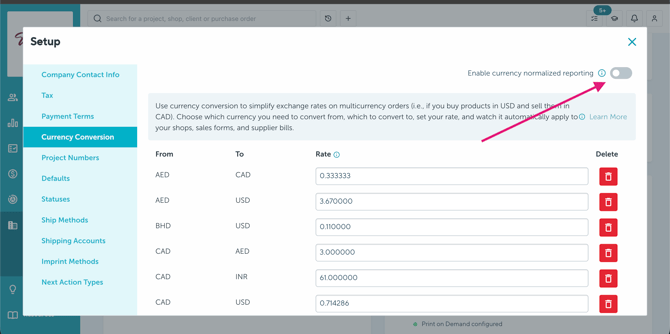
When the feature is turned off:
- Reports return to displaying their original currencies
- The Convert to currency option is no longer available
- Your regular currency conversion setup continues to be used
- Monthly exchange rates you've already entered are kept
If you enable Currency Normalized Reporting again later, your previously entered monthly rates will still be available.
FAQs
- Will converting a report change my invoices, bills, or sales orders?
- Why can't I see the Convert to currency option?
- Why isn't my report converting?
- Which exchange rate does commonsku use when converting a report?
- How are report totals calculated when converting currencies?
- Do monthly exchange rates carry over automatically?
- Can I enter next month's exchange rates in advance?
- Can I add exchange rates for previous months?
- Does commonsku automatically retrieve exchange rates?
- Will updating an exchange rate affect other months?
- Do I need permission to manage exchange rates to convert a report?
- Will my saved report remember the currency I selected?
- Can I switch back to the original currencies without turning off Currency Normalized Reporting?
- Will I lose my monthly exchange rates if I turn off Currency Normalized Reporting?
- Can I convert all reports in commonsku?
Will converting a report change my invoices, bills, or sales orders?
No. Converting a report only changes how amounts are displayed in the report. It doesn't change the original currencies, amounts, or exchange rates on your existing records.
Why can't I see the Convert to currency option?
Currency Normalized Reporting is currently in beta and is only available to Enterprise accounts participating in the beta.
Make sure Enable currency normalized reporting is turned on in Currency Conversion. During the beta, the Convert to currency option is only available in the Commission Report and Sales Rep Report.
Why isn't my report converting?
A required monthly exchange rate may be missing. commonsku displays a message instead of showing the converted report results.
Add the missing exchange rates in Currency Conversion and try again, or select Original to view the report without currency conversion.
Which exchange rate does commonsku use when converting a report?
commonsku uses the exchange rate set for the month in which each transaction is dated, rather than the current month's exchange rate.
For example, if you're converting a report that includes transactions from October and November, commonsku uses October's exchange rates for October transactions and November's exchange rates for November transactions.
How are report totals calculated when converting currencies?
commonsku converts each amount using its corresponding monthly exchange rate before calculating the report totals. This ensures all amounts included in the total are in the same currency.
Do monthly exchange rates carry over automatically?
No. Exchange rates are managed separately for each month. Even if you want to use the same exchange rates as the previous month, you'll need to enter them manually for the new month.
Can I enter next month's exchange rates in advance?
Yes. You can enter exchange rates up to one month in advance.
Can I add exchange rates for previous months?
Yes. You can add historical exchange rates dating back to January 2012. This allows you to convert reports for previous reporting periods.
Does commonsku automatically retrieve exchange rates?
No. Monthly exchange rates must be entered manually in Currency Conversion.
Will updating an exchange rate affect other months?
No. Editing or deleting a monthly exchange rate only affects the month you've selected. Exchange rates saved for other months remain unchanged.
Do I need permission to manage exchange rates to convert a report?
No. As long as Currency Normalized Reporting is enabled and you have access to the supported report, you can convert it to another currency.
Will my saved report remember the currency I selected?
Yes. If you save a report with a currency selected under Convert to currency, commonsku remembers your selection when you open the saved report again.
Can I switch back to the original currencies without turning off Currency Normalized Reporting?
Yes. Select Original from the Convert to currency dropdown to view the report without currency conversion.
Will I lose my monthly exchange rates if I turn off Currency Normalized Reporting?
No. Your monthly exchange rates are retained. If you enable Currency Normalized Reporting again, your previously entered monthly exchange rates will still be available.
Can I convert all reports in commonsku?
Not currently. During the beta, Currency Normalized Reporting is only available in the Commission Report and Sales Rep Report.
Related articles