With this integration, you will have:
- Faster order fulfillment: Export orders in just a few clicks, without downloading or re-uploading files.
- Fewer errors and duplicates: Orders are linked with a unique commonsku reference, so re-exports update existing orders instead of creating duplicates.
- Always in sync: If an order changes in commonsku, you can re-export it and ShipStation will receive the latest version.
- Better experience: Collect shipping addresses at checkout and ship directly to end users, reducing mistakes and improving delivery speed.
-
Scales with your workflow: Export single orders or multiple at once. Background processing and email notifications let you focus on other tasks.
The result is faster fulfillment, fewer manual steps, and a more reliable shipping process.
This feature is only available for the Advanced plan or higher.
Important: This feature is only available for Pop-Up Shops and Connected Shops, as well as Sales Orders that are created from those shops. It is not supported for other shop types.
On this page:
Connecting your ShipStation Account
What Information Is Sent to ShipStation
Important Requirements & Limitations
Connecting your ShipStation Account
Before exporting orders, connect your ShipStation account by following below steps:
-
Go to Settings > Company settings
-
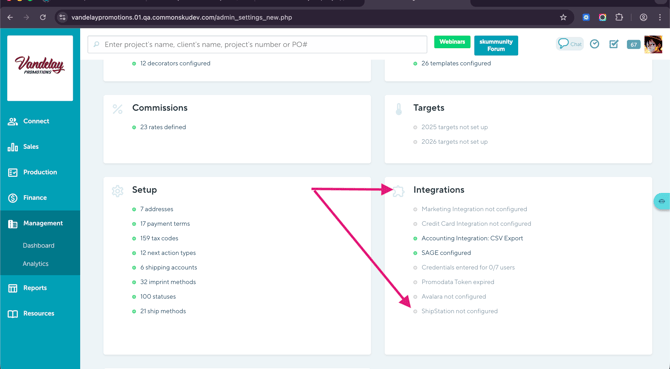
Click on the Integrations
-
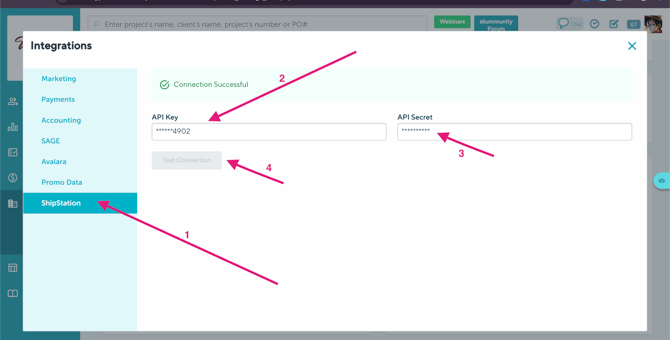
Find ShipStation and click on it
-
Enter your ShipStation API Key and Secret. How? API key and secret should be from ShipStation, then enter them in commonsku. Please check your ShipStation account for your API credentials.
-
Enable the integration and save your settings.
Once setup is complete, the Export to ShipStation button will appear in commonsku.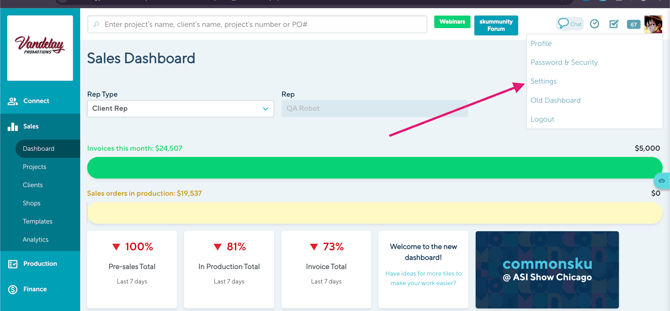
Our platform is not listed as a direct marketplace integration in ShipStation. To connect your store:
- Go to the ShipStation Marketplace
- Search for “Manual”
- Select the manual store option
- Enter your store name to complete setup
Once connected, you’ll receive notifications confirming successful exports or detailing any issues (such as missing shipping address information).
ShipStation API access requires a Standard plan or higher.
How to Export Orders
You can export orders in two ways: either directly from the Sales Order within a project, or from your Pop-Up Shops or connected shops dashboard.
How I can export checkouts from Sales Order?
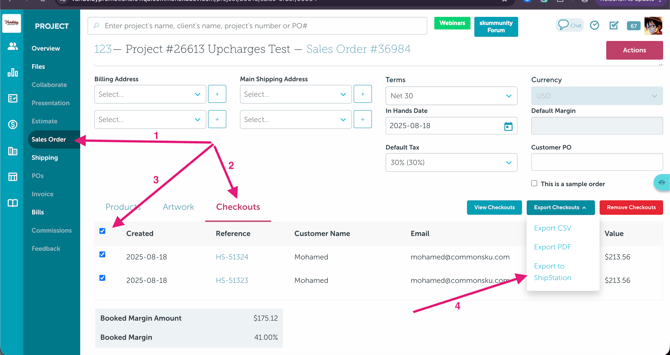
- Go to the Sales order > Click on the Checkouts
- Choose the orders you want to export to ShipStation
- Click on Export Checkouts > Choose Export to ShipStation
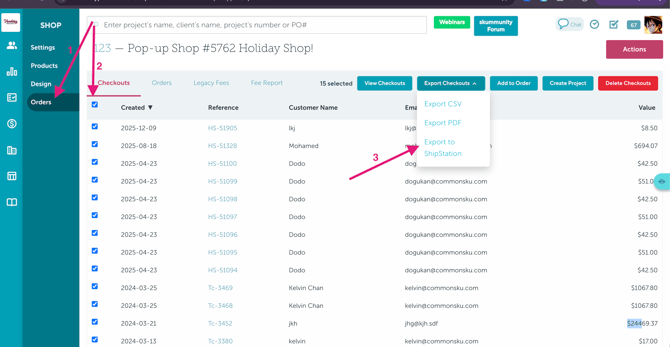
How I can export checkouts from pop_up shops or connected shops?
-
Go to the Shops > Orders
- Choose the checkouts you need to export
- Click on Export Checkouts > Export to ShipStation
Export Limit
You can export up to 100 orders at a time to ShipStation.
If you need to export more than 100 orders, split them into smaller batches and export each batch separately.
For example, if you have 250 orders to export, you will need to complete three exports:
- First export: 100 orders
- Second export: 100 orders
- Third export: 50 orders
This limit applies to each export action and matches ShipStation's limit of 100 orders per request.
Note: If you export an order that has already been sent to ShipStation, the existing order will be updated rather than duplicated.
Please note that exporting orders to ShipStation does not immediately trigger Shop fees during the 7-day grace period.
After the 7-day grace period ends, applicable Shop fees will be automatically charged.
For more details about Shop fees, please refer to this article: Shop fees
If the order has already been exported, exporting again will update the existing ShipStation order rather than create a duplicate.
What Information Is Sent to ShipStation
commonsku automatically sends:
-
Order number and order date
-
Customer name and shipping address
-
Line items, quantities, and pricing
-
Order total and shipping amount
-
Buyer comments and checkout questions
Additional Details
-
Discounts are sent as adjustments
-
Shipping is included in the order total
-
Internal notes are limited to 1,000 characters
What Happens in ShipStation
-
Orders are created with the status “Awaiting Payment”
-
Each order includes a unique commonsku reference
-
Repeat exports update the same order using this reference
This ensures order synchronization and prevents duplicates.
Export Status & Notifications
-
A confirmation appears after clicking Export to ShipStation
-
An email notification is sent once the export finishes, confirming success or failure. If an export fails, the notification will provide details.
Important Requirements & Limitations
To successfully export orders:
-
Orders must include both billing and shipping addresses
-
A maximum of 100 orders can be exported per export action. For larger exports, select and export orders in batches of 100 or fewer.
-
Distributors must enable “Collect shipping address at checkout”
-
Shipping addresses cannot be added after checkout
-
If a shipping address is missing, the order cannot be exported
-
Multi-currency orders are not supported
-
Orders must use the primary currency configured in ShipStation
If an order does not meet these requirements, the export will be blocked and you will be notified.
FAQs
-
commonsku is not listed as a marketplace in ShipStation — how do I connect it?
- Why I don't see an option for exporting to ShipStation?
-
Why does nothing happen when I click “Export to ShipStation”?
- Can I export multiple orders at once?
-
Can ShipStation sync tracking information and shipping costs back to commonsku?
- What happens if I export the same order twice?
- Why is my order export blocked?
- Who will get notified once the export is done?
commonsku is not listed as a marketplace in ShipStation — how do I connect it?
commonsku connects to ShipStation using a Manual Store setup.
To connect:
-
Go to the ShipStation Marketplace
-
Search for “Manual”
-
Select Manual Store
-
Enter your store name and complete the setup
Once the store is created and your integration is connected in commonsku, it will populate automatically, and you’ll be able to export orders to ShipStation.
Why does nothing happen when I click “Export to ShipStation”?
Before exporting, you must first create a Store inside ShipStation.
Once your store is set up in ShipStation and the integration is connected, your store will automatically populate in commonsku.
When you click Export to ShipStation, you’ll then be able to select your store from the dropdown.
If no store exists in ShipStation, nothing will appear to export.
Why I don't see an option for exporting to ShipStation?
There are two common reasons:
1. ShipStation isn’t integrated.
Go to Settings > Integrations and make sure ShipStation is connected.
2. The shop / Project type isn’t supported.
Exporting to ShipStation is only available for:
-
Pop-Up Shops
-
Connected Shops
-
Sales Orders created from those shops
Can I export multiple orders at once?
Yes. You can export multiple checkouts from the Sales Order or Shop view.
Can ShipStation sync tracking information and shipping costs back to commonsku?
No — the integration is currently one-way only.
Orders can be exported from commonsku to ShipStation, but tracking details and shipping costs do not sync back into commonsku.
What happens if I export the same order twice?
The existing ShipStation order will be updated with the latest information.
Why is my order export blocked?
Common reasons is Shipping address collection not enabled.
Who will get notified once the export is done?
The person who exports the checkouts to ShipStation is the one who receives the email notification with the export status.
So whoever initiates the export will get the confirmation/update email.
Can I export multiple orders at once?
Yes! You can export multiple checkouts at once from the Sales Order or Shop view.
You can export up to 100 orders per export action.
If you have more than 100 orders, you will need to export them in separate batches.
For example, to export 150 orders, you can export the first 100 orders, then export the remaining 50.
If an order has already been exported, exporting it again will update the existing order in ShipStation instead of creating a duplicate.