On this page
- commonsku Payments overview
- Before you get started
- Set up commonsku Payments
- Complete your application
- commonsku Payment methods
- Accept payments on:
- Processing fees
- Monitor your payment activity
- Refund a Payment
- QuickBooks Online and commonsku Payments
- FAQs
commonsku Payments overview
commonsku Payments is commonsku's built-in payment processing option. Once approved, your clients can pay invoices, deposit invoices, and Shop orders by credit card or ACH directly through commonsku, while you can manage your transactions and payouts from one place.
commonsku Payments is ideal for distributors who want to simplify payment collection and reduce reliance on a separate payment portal.
Before you get started
commonsku Payments is currently available in Beta to distributors located in the United States.
Before you apply, keep in mind:
- Permissions:
Users need Manage users, billing, and company settings permission to set up and manage commonsku Payments for their company.
Users also need View Finance Menu permission to access commonsku Payments activity under Finance > Payments.
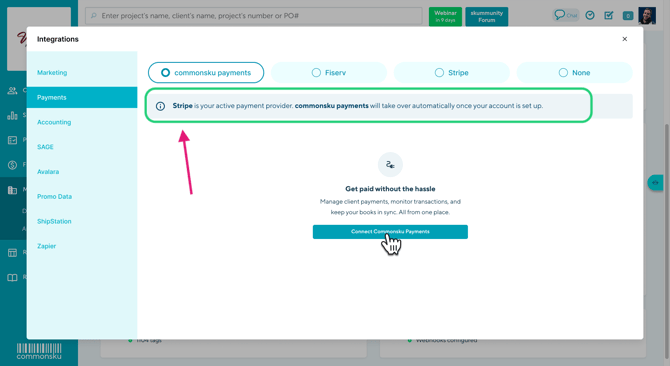
- One integration at a time: commonsku Payments works alongside your existing Stripe or Fiserv setup during your application, but only one credit card/ACH provider can be active for your account at a time. Once you're approved, commonsku Payments becomes your active payment provider.
- Approval isn't instant: your application is reviewed before you can start accepting payments. See Application statuses for what to expect.
Set up commonsku Payments
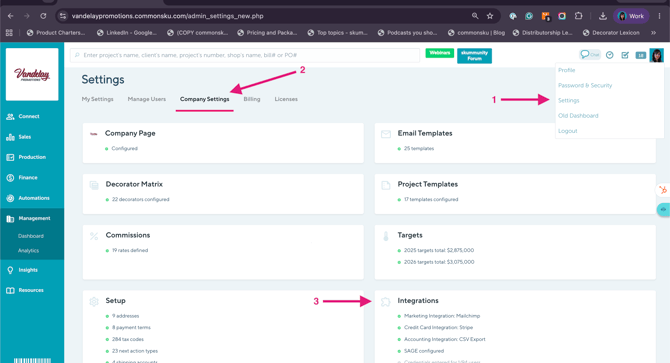
- Click your Profile icon (top right corner of commonsku).
- Select Settings > Company Settings > Integrations.
- Select Payments.
- Select commonsku Payments.
- Click Get Started to begin your application.
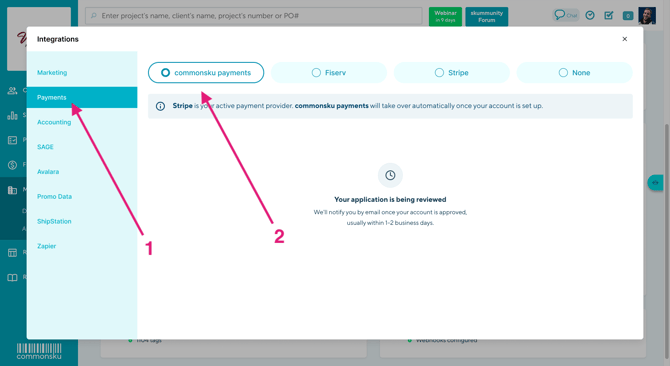
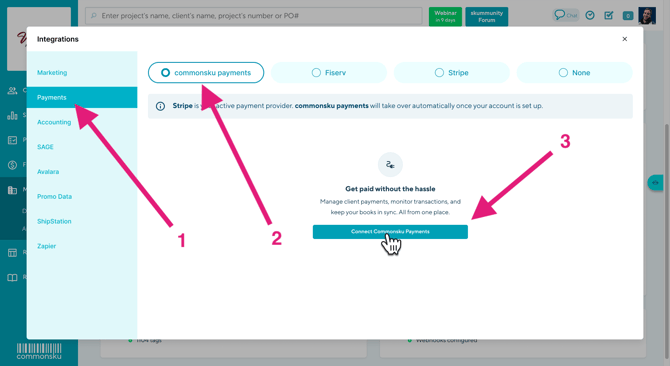
📝 Note: Selecting commonsku Payments here starts your application — it doesn't change which provider is actively processing your payments until your application is approved.
Complete your application
Starting your application opens a secure application form. You'll be asked to provide information about your business and its owner(s) so your account can be reviewed and approved.
Follow the instructions provided in the application and complete the required fields.
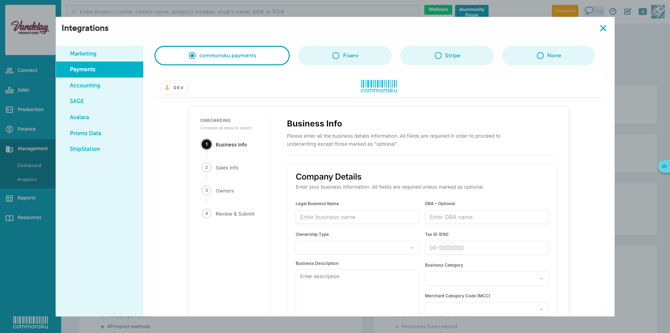
Important: Have your business registration and banking information ready before you begin. If you need to stop partway through, your progress is saved. Return to Settings > Company Settings > Integrations > Payments to continue your application.
Application Statuses
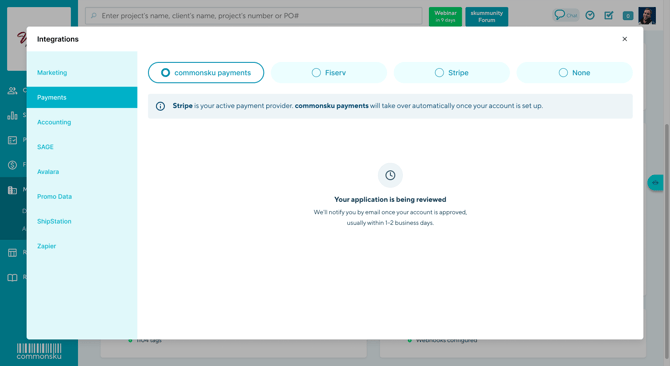
After you submit your application, you can check its progress from Settings > Company Settings > Integrations > Payments at any time. In general, your application will move through a few stages before you can start accepting payments:
- Under review — your application has been submitted and is being reviewed.
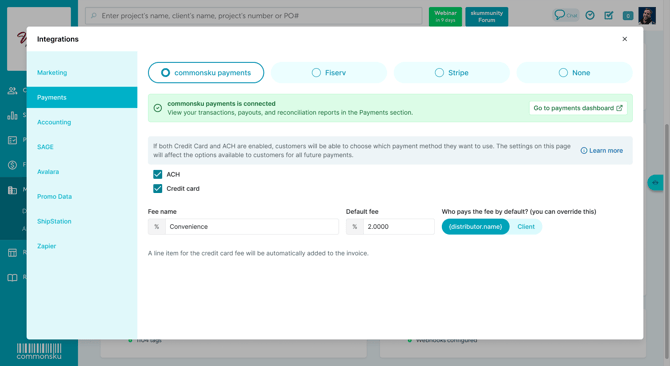
- Approved — your application has been approved and commonsku Payments is now your active payment provider.
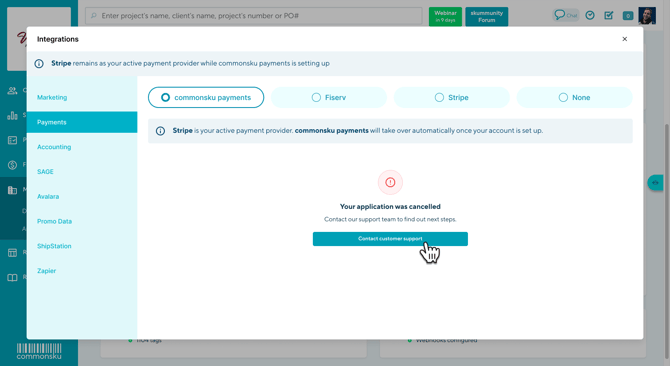
- Declined — Your application was not approved. Contact support@commonsku.com if you'd like more information or want to discuss reapplying.
⚠️ Note: If your application needs more information before it can be reviewed, you'll be notified by email with next steps. The exact status labels you see on screen may differ slightly from the stage names above.
commonsku Payment methods
commonsku Payments supports Credit Card and ACH, which can be enabled or disabled independently.
From Settings > Company Settings > Integrations > Payments, you can:
- Turn Credit Card and ACH on or off independently.
- Choose whether you pay the processing fee or charge it to your client.
- Set the name used for the client-facing fee.
Note: These settings determine how processing fees are passed along to your client. They do not determine the processing rate charged to your company. Your processing rate is established as part of your commonsku Payments application and setup.
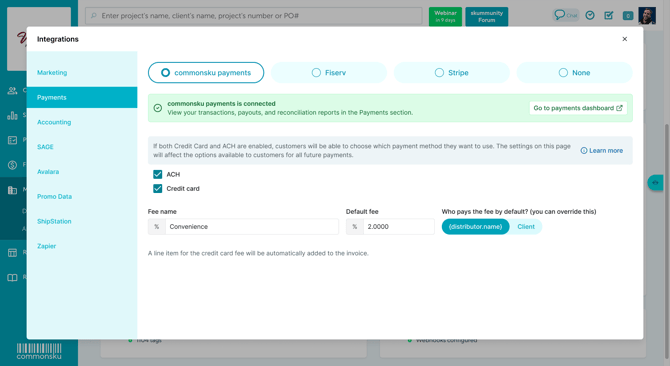
📝 Note: If your client doesn't see the payment option you expect, go to Settings > Company Settings > Integrations > Payments > commonsku Payments and check that your payment settings are configured correctly.
Note: Users need permission to "Manage users, billing, and company settings" to change these settings.
Accept payments
Once your application is approved, you can start collecting payments through commonsku Payments on:
- Invoices — collect full payment on an invoice.
- Deposit Invoices — collect a deposit against a sales order.
- Sales Orders with upfront payment required — collect payment directly on the sales order.
- Shops — collect credit card payments at checkout.
Depending on the form and the payment methods enabled for your account, your client can select Pay by Credit Card or Pay by ACH. Shop checkouts currently support credit card payments only.
Note: The related invoice, deposit invoice, sales order, or shop order updates automatically once the payment is confirmed — you don't need to mark anything as paid yourself. See Payment and transaction statuses below.
Payment and transaction statuses
Processing times vary by payment method:
- Credit card payments can take up to 2 days to process.
- ACH payments can take up to 4 days to process.
You can check the status of any transaction from Payment Activities under Finance > Payments> Transactions.
Processing fees
commonsku Payments charges a processing fee on transactions. Your processing rate is established as part of your commonsku Payments application and account setup.
Once commonsku Payments is active, you can choose to absorb the processing fee or pass it along to your client.
You can also customize the name of the client-facing fee.
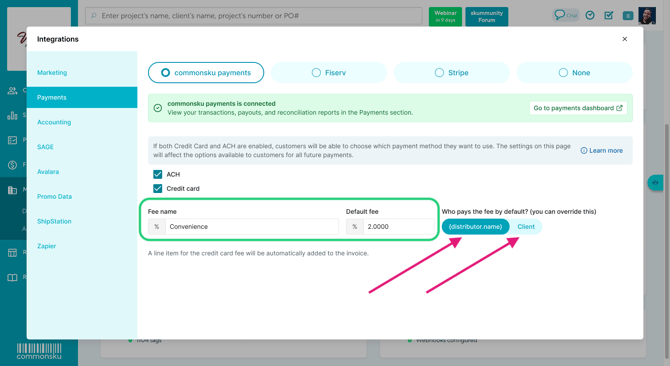
Important: If you choose to pass the processing fee along to your client, the client-facing fee is capped at 3% of the transaction total. You cannot configure a fee above this limit. If you try to set a fee above the cap, commonsku Payments will show an error when your client attempts to pay.
Note: If a payment is refunded, the processing fee associated with that payment is not refunded.
For information about your applicable processing rate, contact your commonsku representative or support@commonsku.com.
Monitor your payment activity
The commonsku Payments Dashboard gives you a quick overview of your payment activity and helps you keep track of money moving through commonsku Payments.
Note: Users need the View Finance Menu permission to access commonsku Payments activity under Finance > Payments.
Go to Finance > Payments > Dashboard to view your payment activity for a selected date range, including:
- Payments — the total value of payments processed through commonsku Payments.
- Refunds — the total value of payments that have been refunded to clients.
- Disputes — payments that have been disputed by a client.
- Risk Holds — funds that are currently being held.
- Payouts — funds that have been sent to the bank account connected to your commonsku Payments account.
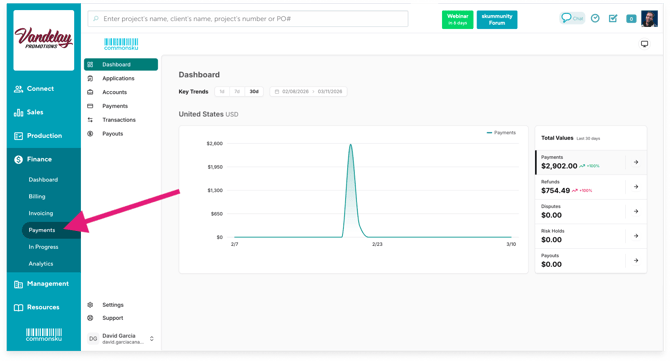
The Key Trends graph provides a visual overview of your payment activity over time. Use the available date options or select a date range to review activity for a specific period.
For more detailed information, use the Transactions and Payouts sections under Finance > Payments:
- Go to Transactions to review individual payment activity and transaction history.
- Go to Payouts to review funds paid out to your connected bank account and the transactions associated with each payout.
Approved funds are deposited into the bank account provided during your commonsku Payments application according to your payout schedule.
Refund a payment
Payments made through commonsku Payments can be refunded from the corresponding transaction under Finance > Payments > Transactions.
Locate the payment you need to refund, and follow the available refund option.
commonsku Payments currently supports full refunds only. Partial refunds and multiple refunds for the same payment are not currently supported.
Note: Processing fees associated with the original payment are not returned when the payment is refunded.
QuickBooks Online and commonsku Payments
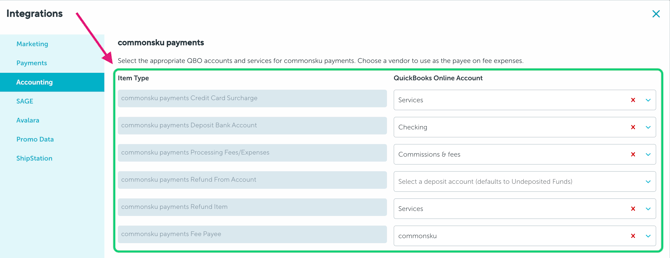
If you use QuickBooks Online (QBO) with commonsku Payments, you can configure dedicated QBO accounts and services for commonsku Payments activity.
To configure your mappings:
- Go to Settings > Company Settings > Integrations.
- Select Accounting.
- In the commonsku payments section, select the appropriate QuickBooks Online account or service for each item.
You can configure mappings for:
-
commonsku payments Credit Card Surcharge: The QuickBooks product or service on the surcharge Sales Receipt. The line description stays "commonsku payments Credit Card fee". This mapping is required.
-
commonsku payments Deposit Bank Account: The bank account the payout deposit lands in. The fee expense is also paid out of this account. The customer Payment and the surcharge Sales Receipt sit in Undeposited Funds until that deposit.
-
commonsku payments Processing Fees/Expenses: The expense or COGS account on the fee Purchase for the payout. This mapping is required.
-
commonsku payments Refund From Account: The account a Refund Receipt is drawn from, after the payment has already been deposited. If this is unset, the Refund Receipt uses Undeposited Funds. A refund before the payout voids the Payment and deletes the Sales Receipt, and does not use this account.
-
commonsku payments Refund Item: The product or service on the Refund Receipt line. If this is unset, it uses the Invoice Service mapping.
-
commonsku payments Fee Payee: The QuickBooks vendor on the fee Purchase. If this is unset, the Purchase is posted with no vendor.
📝 Note: These settings are specific to transactions processed through commonsku Payments and are separate from your other QuickBooks Online mappings.
FAQs
Is commonsku Payments available to everyone?
I don't see the commonsku Payments option in my Integrations settings.
Do I have to switch from Stripe or Fiserv to use commonsku Payments?
How long does the application approval process take?
My client doesn't see a payment option I expected.
Can my client pay part of an invoice and the rest later?
I need help with a refund, payout, or a transaction that looks incorrect.
Will commonsku Payments automatically update my invoice to Paid?
Does commonsku Payments work with QuickBooks Online?
Who do I contact if I need help with commonsku Payments?
Does the credit card fee work with commonsku Payments?
Can I transfer my payment information from Stripe or Fiserv to commonsku Payments?
How are commonsku Payments fees calculated on my invoice?
Is commonsku Payments available to everyone?
commonsku Payments is currently available in Beta to distributors in the United States.
I don't see the commonsku Payments option in my Integrations settings.
Confirm you have permission to Manage users, billing, and company settings, and that commonsku Payments is available in your region.
If you believe you should have access, contact support@commonsku.com.
Do I have to switch from Stripe or Fiserv to use commonsku Payments?
No. You can continue using your existing Stripe or Fiserv integration while your commonsku Payments application is being reviewed.
Only one payment provider can actively process payments for your account at a time. Once your commonsku Payments application is approved, commonsku Payments becomes your active payment provider.
How long does the application approval process take?
The review process for your commonsku Payments application will begin within 48 hours of submission.
You can monitor your application status under Settings > Company Settings > Integrations > Payments, where you'll see updates and any next steps.
My client doesn't see a payment option I expected.
Confirm that the payment method (Credit Card or ACH) is enabled in your commonsku Payments settings. To review your settings, go to Settings > Company Settings > Integrations > Payments.
Can my client pay part of an invoice and the rest later?
Yes. If you need to collect payments at different stages of a project, you can use Deposit Invoices or create multiple invoices for the same project.
Adjust the amount on each invoice as needed, then send the invoices to your client separately for payment.
Can I offer partial refunds?
Not yet. commonsku Payments currently supports full refunds only. Partial refunds and multiple refunds are not yet supported.
I need help with a refund, payout, or a transaction that looks incorrect.
For information about issuing a refund, see the Refund a Payment section above.
You can also review your payment activity under Finance > Payments. If a refund, payout, or transaction doesn't look correct, contact support@commonsku.com for assistance.
Will commonsku Payments automatically update my invoice to Paid?
Yes. Once a payment is successfully confirmed, the related document updates automatically.
Processing times vary by payment method. Credit card payments can take up to 2 days to process, while ACH payments can take up to 4 days. The document will update once the payment has been successfully confirmed.
Does commonsku Payments work with QuickBooks Online?
Yes. If your commonsku account is connected to QuickBooks Online, you can configure dedicated QBO mappings for commonsku Payments.
Go to Settings > Company Settings > Integrations > Accounting and use the commonsku payments section to select the accounts and services used for deposits, processing fees/expenses, and refunds.
See the QuickBooks Online and commonsku Payments section above for setup instructions.
Who do I contact if I need help with commonsku Payments?
Contact support@commonsku.com any time if you have questions about your application, payments, refunds, payouts, or transactions.
Does the credit card fee work with commonsku Payments?
The credit card fee functionality for commonsku Payments is currently available to U.S. distributors only.
- U.S. distributors: You can choose to processing fee or pass it along to your client through your commonsku Payments settings.
- Canadian distributors: The credit card fee cannot currently be automatically passed along to the client through commonsku Payments. If you need to charge your client a credit card fee, add it manually to the order as a service line item.
Note: For Canadian accounts, the service line item is manually added and is separate from the processing fee charged through commonsku Payments.
Can I transfer my payment information from Stripe or Fiserv to commonsku Payments?
No. Existing payment information and history from Stripe or Fiserv cannot be migrated to commonsku Payments.
When you switch to commonsku Payments, your commonsku Payments account starts with its own payment activity and transaction history. Any historical payment information from your previous provider will remain with that provider.
How are commonsku Payments fees calculated on my invoice?
For more information about the fees that apply to your account, please contact support@commonsku.com or your commonsku representative.