A custom domain lets shoppers visit your shop using an address connected to your or your client's brand, such as:
shop.yourcompany.com
instead of the standard commonsku shop URL.
Custom domains are available on all commonsku plans.
On this page
- Why use a custom domain?
- Who can use custom domains?
- Before you begin
- Domains and subdomains
- Access your DNS settings
- How custom domains work
- Set up a custom domain
- Verify your custom domain
- Disconnect or change a custom domain
- Fully Deleting a Domain
- Custom domain limitations
- FAQs
Why use a custom domain?
A custom domain gives your shop a branded web address instead of a commonsku URL.
For example:
shop.yourcompany.com
This can help you:
- Match the shop address to your or your client's brand
- Share a cleaner and easier-to-remember link
- Give shoppers a more consistent branded experience
You'll still create and manage the shop in commonsku. The custom domain changes the web address shoppers use to open it.
Who can use custom domains?
Custom domains are available on all commonsku plans.
They can be used with:
Any user with permission to create and manage shops can also manage the custom domain connected to a shop.
Note: Custom domains are not available for Shopify Connected Shops. Because Shopify hosts these storefronts, their domains are managed directly through Shopify.
There is no additional commonsku fee to connect a custom domain. However, you need to own the domain and are responsible for any fees charged by your domain provider.
Before you begin
Before setting up a custom domain, you'll need:
- A domain you already own
- Access to the DNS settings for that domain
- A subdomain you want to use, such as
shop.yourcompany.com
If someone else manages your company's website or domain, you may need their help to add the DNS records provided by commonsku.
You do not need to move your website or purchase a domain through commonsku.
Domains and subdomains
What is a domain?
A domain is the main web address people use to visit a website.
For example:
yourcompany.com
Domains are purchased and managed through a domain provider such as GoDaddy, Namecheap, Cloudflare, or another DNS provider.
commonsku does not sell or register domains.
What is a subdomain?
A subdomain adds another section before your main domain.
For example:
Main domain
yourcompany.com
Subdomain
shop.yourcompany.com
In this example, shop is the subdomain.
For commonsku shops, we recommend using a subdomain such as:
shop.yourcompany.com
This lets your existing website and your commonsku shop use separate addresses.
For example:
yourcompany.com → Your regular website
shop.yourcompany.com → Your commonsku shop
If you want visitors going to your main website address to reach your shop, your domain provider may also allow you to create a redirect to your shop address.
Access your DNS settings
DNS settings control where your domain sends visitors.
When you connect a domain to commonsku for the first time, commonsku provides DNS records that need to be added through your domain provider.
These records tell the internet where your shop should be opened and help commonsku confirm that you control the domain.
You don't need to understand DNS in detail. In most cases, you only need to copy the information shown in commonsku and add it to the matching fields with your domain provider.
What DNS records will I see?
During setup, you may see records such as:
-
CNAME
-
TXT
What does a CNAME record do?
The CNAME record points your custom shop address to commonsku.
For example, it helps tell browsers that:
shop.yourcompany.com
should open your commonsku shop.
What does a TXT record do?
The TXT record helps commonsku confirm that you control the domain you are trying to connect.
Think of it as an ownership check.
How custom domains work
When you connect a domain to your commonsku account for the first time, there are three main steps:
- Add the custom domain to your shop in commonsku.
- Add the DNS records provided by commonsku to your domain provider.
- Return to commonsku and verify the domain.
Once the domain is successfully verified, commonsku secures the connection and your shop can be opened using the custom address.
Custom domains need to be a subdomain — root (apex) domains aren't supported yet.
Use something like shop.yourdomain.com, store.yourdomain.com, or gifts.yourdomain.com.
Why: pointing a root domain requires DNS support that most providers don't offer. A few — Cloudflare, for example — do support it, but since most don't, we recommend using a subdomain regardless of your provider.
Want your root domain to redirect to your shop? Most domain providers offer domain forwarding, which sends visitors who type your root domain straight to your subdomain.
Set up a custom domain
To connect a custom domain for the first time:
- Open the shop you want to update.
- Go to Shop Settings > General > Custom Domains.
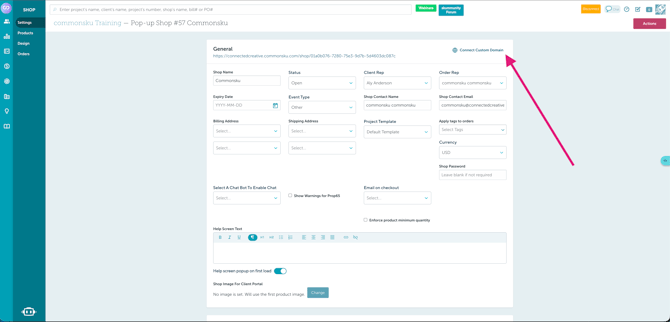
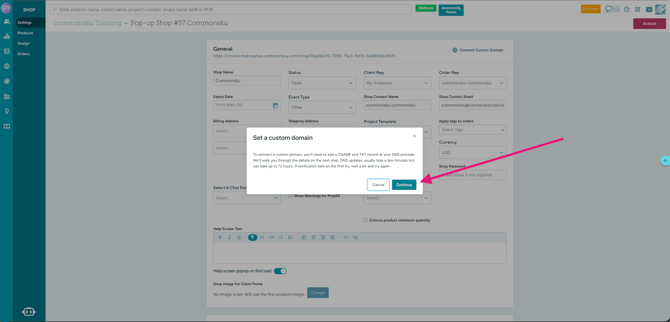
- Enter and submit the domain you want to use.
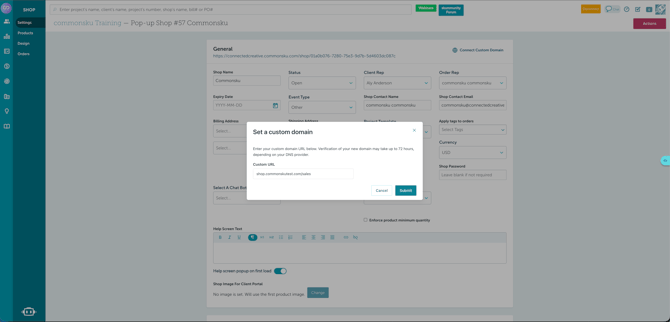
- commonsku displays the DNS records required for the connection.
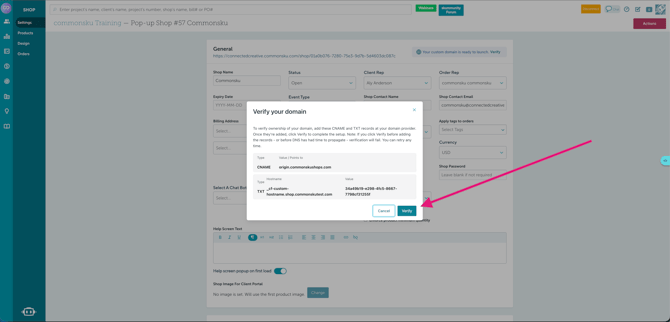
- Open your domain provider in another browser tab.
- Go to the DNS settings for your domain.
- Add the records exactly as they appear in commonsku.
- Save the DNS changes.
- Return to Shop Settings > General > Custom Domains.
- Verify the domain.
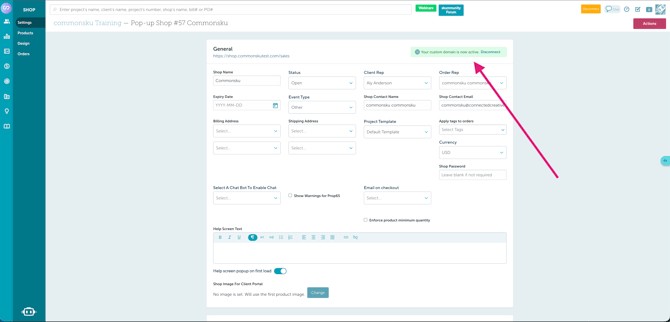
Tip: Copy and paste the DNS values whenever possible instead of typing them manually.
commonsku looks for the DNS information shown during setup.
If a record type, name, or value is entered differently, commonsku may not be able to confirm the connection.
Also make sure there are no extra spaces or characters in the values.
If something doesn't match, you'll see an error message when you try to verify the domain.
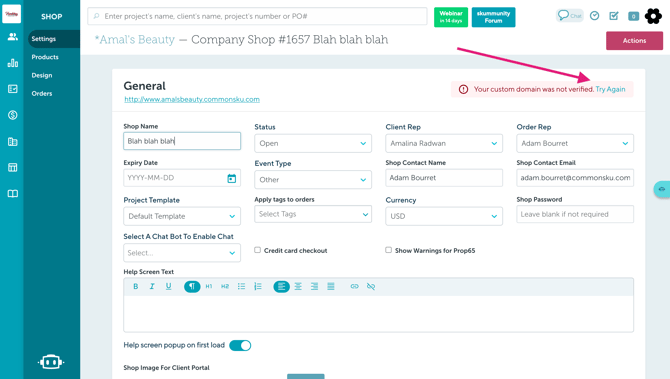
Note: DNS changes are not always immediate. Depending on your domain provider, it can take some time before commonsku can detect the new records.
Verify your custom domain
After you have added the DNS records, return to Shop Settings > General > Custom Domains
commonsku checks for the required records.
If the records are found and everything is correct, the domain becomes verified.
Once verification is complete:
- The custom domain is connected to your shop.
- commonsku sets up a secure
https://connection. - Shoppers can open the shop using your custom domain.
Custom domains need to be a subdomain — root (apex) domains aren't supported yet.
Use something like shop.yourdomain.com, store.yourdomain.com, or gifts.yourdomain.com.
Why: pointing a root domain requires DNS support that most providers don't offer. A few — Cloudflare, for example — do support it, but since most don't, we recommend using a subdomain regardless of your provider.
Want your root domain to redirect to your shop? Most domain providers offer domain forwarding, which sends visitors who type your root domain straight to your subdomain.
Changes made to DNS settings may take some time to update across the internet.
This is sometimes called DNS propagation.
If the information you entered is correct but commonsku can't find it yet, you may simply need to wait and check the domain status again later.
Once a domain is verified, you can use it for more than one shop at the same time.
For example:
shop.yourcompany.com/summer-sale → Shop A
shop.yourcompany.com/winter-sale → Shop B
Both shops use the same domain and DNS setup, so you don't need to verify the domain again for each shop.
Each shop still has its own unique URL and remains a separate shop in commonsku.
Disconnect or change a custom domain
You can disconnect a custom domain from a shop at any time.
To disconnect it:
- Go to Shop Settings > General > Custom Domains.
- Select the connected domain.
- Click Disconnect.
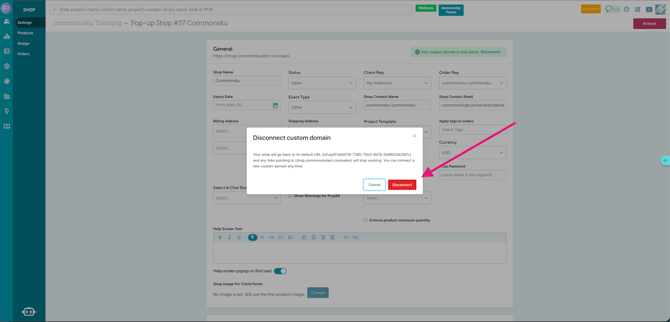
- Confirm the change.
After the domain is disconnected, the shop can continue to use its commonsku shop URL.
Fully deleting a domain
If you are disconnecting the last shop using that domain, you may also see an option to fully delete the domain.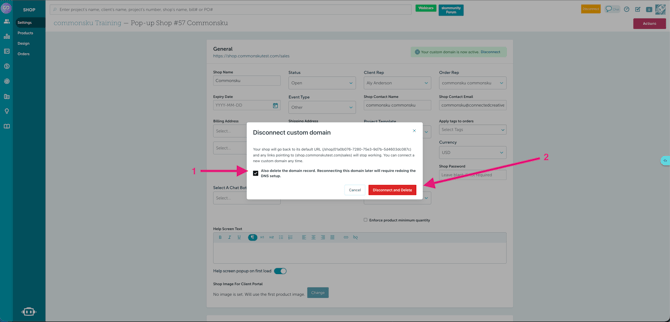
You won't see this option while another shop is still using the domain, because deleting it would affect the other connected shop.
If you choose to fully delete the domain:
- The saved domain connection is removed.
- The existing verification is removed.
- The related domain setup is removed from commonsku's side.
- If you want to connect that domain again later, you will need to complete the DNS verification process again.
- commonsku will provide a new TXT verification value during the new setup.
If you do not fully delete the domain, commonsku keeps the verified domain information so it can be reused later.
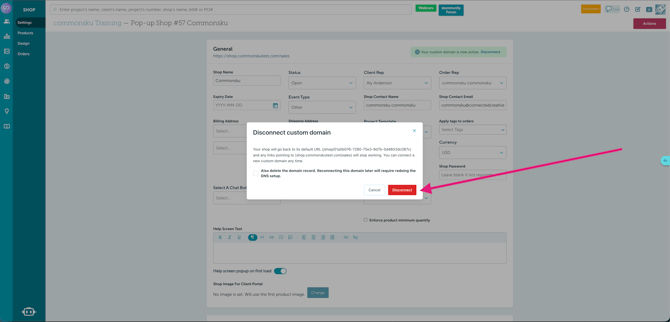
If you want the shop to use a different custom domain:
- Disconnect the current custom domain.
- Connect the new domain.
- Complete the verification steps for the new domain if it has not already been verified for your account.
Custom domain limitations
Here are some things to keep in mind when using custom domains.
1. We recommend using a subdomain
For most setups, use a subdomain such as:
shop.yourcompany.com
instead of the main or root domain:
yourcompany.com
Root domains can behave differently depending on the DNS provider being used. Some DNS providers do not allow the type of record needed to connect a root domain.
Because of this, using a subdomain is the most reliable option.
It also allows your main website and commonsku shop to stay separate.
For example:
yourcompany.com → Main website
shop.yourcompany.com → commonsku shop
Custom domains need to be a subdomain — root (apex) domains aren't supported yet.
Use something like shop.yourdomain.com, store.yourdomain.com, or gifts.yourdomain.com.
Why: pointing a root domain requires DNS support that most providers don't offer. A few — Cloudflare, for example — do support it, but since most don't, we recommend using a subdomain regardless of your provider.
Want your root domain to redirect to your shop? Most domain providers offer domain forwarding, which sends visitors who type your root domain straight to your subdomain.
2. A shop can only have one active custom domain at a time
A single shop can't have multiple active custom domains at the same time.
For example, the same shop can't use both:
shop.yourcompany.com
and
store.yourcompany.com
as separate active custom domains.
If you want the shop to use another domain, disconnect the current one and connect the new one.
3. The same verified domain can be used for multiple shops
Although each shop can only have one active custom domain, the same verified domain can be used for multiple shops. The domain only needs to be verified once, but each shop gets its own unique URL.
For example:
shop.yourcompany.com/summer → Shop A
shop.yourcompany.com/winter → Shop B
Both shops use the same verified domain, but their full web addresses are different.
4. Shopify Connected Shops aren't supported
Custom domains for Shopify Connected Shops must be managed in Shopify. Because Shopify hosts those storefronts, Shopify controls their domain setup.
5. DNS changes can affect your custom domain
Even after your domain has been successfully connected, changes made later through your domain provider can affect the connection.
For example, the custom domain may stop working if:
- A required DNS record is deleted.
- A required DNS record is changed.
- Your domain expires.
The DNS records tell browsers where your shop is located. If those instructions are changed or removed, the custom domain may no longer reach your shop.
Your commonsku shop URL should continue to be available if there is a problem with your custom domain.
6. Some fonts may look different
You may notice that some fonts appear slightly different when your shop is viewed through a custom domain.
Some fonts have licensing rules that limit the domains where they can be displayed.
When a font can't be used on the custom domain, another compatible font may be displayed instead.
This does not affect how the shop works.
FAQs
Why isn't my domain verifying?
What happens to my original commonsku shop link?
Why am I seeing an invalid domain message?
Do I need to buy a domain from commonsku?
Is there an additional fee for using a custom domain?
Why does commonsku say my domain is already in use?
What's the difference between a domain and a subdomain?
Can I use my main domain, such as yourcompany.com?
Why isn't my domain working immediately after I add the DNS records?
Why did my custom domain stop working?
Can I connect a custom domain while creating my shop?
Can I connect a custom domain to a Shopify Connected Shop?
Can I use the same custom domain for more than one shop?
Why don't I need to add the TXT record again when I use the same domain?
What happens when I disconnect a domain?
What's the difference between disconnecting and fully deleting a domain?
Should I remove my DNS records after disconnecting a domain?
Can I change my custom domain later?
Why am I seeing a security or SSL certificate warning?
Why isn't my domain verifying?
commonsku may not be able to find the DNS records needed to connect your domain.
Go to Shop Settings > under General section check Domain and compare the records shown there with the records saved through your domain provider.
Check that:
- The record type is correct.
- The value matches.
- There are no extra spaces or characters.
If everything looks correct, the DNS changes may still be updating. Wait a little longer and check the domain status again.
What happens to my original commonsku shop link?
Your commonsku shop link remains available.
Once your custom domain is active, shoppers using the commonsku shop link can be directed to the custom domain.
This means previously shared shop links and bookmarks can continue working.
Why am I seeing an invalid domain message?
Check that the web address was entered correctly.
For example:
shop.yourcompany.com
Make sure there are no:
- Spaces
- Missing parts
- Extra characters
- Typing errors
If the shop uses a path, also make sure the full shop address is entered correctly.
Do I need to buy a domain from commonsku?
No.
Purchase and manage your domain through the domain provider of your choice.
commonsku connects a domain you already own to your shop.
Is there an additional fee for using a custom domain?
There is no additional commonsku fee for connecting a custom domain on a supported plan.
You're still responsible for any fees charged by your domain provider for purchasing and maintaining the domain.
Why does commonsku say my domain is already in use?
The domain may already be connected to another shop using the same shop address.
A verified domain can be used for more than one shop, but each shop needs its own unique URL.
For example:
shop.yourcompany.com/summer → Shop A
shop.yourcompany.com/winter → Shop B
If you see an "already in use" message, check whether the exact URL you're trying to use is already connected to another shop.
What's the difference between a domain and a subdomain?
A domain is your main web address:
yourcompany.com
A subdomain adds another section before it:
shop.yourcompany.com
For commonsku shops, using a subdomain is recommended because it allows your main website and shop to remain separate.
Can I use my main domain, such as yourcompany.com?
Root or main domains depend on what your DNS provider supports.
Some providers don't allow the type of DNS record needed to connect a root domain.
For the most reliable setup, we recommend using a subdomain such as:
shop.yourcompany.com
Why isn't my domain working immediately after I add the DNS records?
DNS changes can take time to update.
Even when the information is correct, commonsku may not detect the new records immediately.
Wait and check the domain status again later.
Why did my custom domain stop working?
A custom domain can stop working if:
- A required DNS record was changed.
- A required DNS record was removed.
- The domain expired.
Check the domain and DNS settings with your domain provider.
Your original commonsku shop URL should continue to work while you fix the custom domain.
If the DNS records look correct and the domain still isn't working, contact commonsku Support.
Can I connect a custom domain while creating my shop?
No.
Create the shop first, then set up the custom domain through:
Shop Settings > Domains
Can I connect a custom domain to a Shopify Connected Shop?
No.
Shopify hosts Shopify Connected Shops, so their domains need to be managed through Shopify.
Can I use the same custom domain for more than one shop?
Yes.
Once a domain has been verified for your commonsku account, it can be used with more than one eligible shop.
For example:
shop.yourcompany.com/summer-sale
shop.yourcompany.com/winter-sale
Each address can lead to a separate commonsku shop.
Because the domain has already been verified, you do not need to repeat the full TXT verification process for every shop.
Why don't I need to add the TXT record again when I use the same domain?
The TXT record is used to confirm that you control the domain.
Once commonsku has successfully verified that domain for your account, it can keep that verification on file.
If the verified domain has not been fully deleted, it can be reused without repeating the ownership check.
What happens when I disconnect a domain?
Disconnecting removes the custom domain from that shop.
If you disconnect the domain without fully deleting it, commonsku keeps the verification so you can reuse the domain later.If other shops still use the domain, their connections are not removed.
What's the difference between disconnecting and fully deleting a domain?
Disconnecting removes the domain from the current shop but can keep the verified domain available for future use.
Fully deleting removes the saved domain verification completely.
If you fully delete it and want to use the domain again later, you'll need to complete DNS verification again with the new TXT value provided by commonsku.
The option to fully delete a domain only appears when you're disconnecting the last shop using that domain.
Should I remove my DNS records after disconnecting a domain?
It depends on whether you plan to reuse the domain.
If you're keeping the domain verified in commonsku because you may use it with another shop, don't remove the required DNS records.
If you're fully deleting the domain and no longer plan to use it with commonsku, you can remove the related records from your domain provider.
Can I change my custom domain later?
Yes.
Disconnect the existing domain, then connect the new one.
If the new domain hasn't already been verified for your commonsku account, you'll need to complete its DNS verification.
Why am I seeing a security or SSL certificate warning?
commonsku creates and manages the SSL certificate for your custom domain.
If the domain was recently verified, the secure connection may still be finishing its setup.
Try opening the domain again later.
If the warning continues, contact commonsku Support.